 AI with consistency, context and control.
Secure collaboration for critical infrastructure and construction
Critical projects. Connected teams. Secure information.
Securely share plans, operational documents and sensitive files with contractors, consultants and delivery partners.

Securely share plans, operational documents and sensitive files with contractors, consultants and delivery partners.
Energy, water, transport, telecommunications and construction projects depend on information moving between organisations. Operators, developers, engineers and contractors need access to current documents to coordinate work and make informed decisions.
When files circulate through email attachments and disconnected sharing tools, teams can lose track of versions, permissions and who has received sensitive information.
Objective Connect provides a controlled workspace for external collaboration. Share large files, coordinate document reviews and work with delivery partners while maintaining protection, oversight and accountability.
Connect people. Protect sensitive information. Maintain trust.

Keep shared files in Australian-hosted cloud infrastructure, providing clarity over data residency when exchanging sensitive infrastructure plans, operational documents and project information.
Support security assurance processes with IRAP-assessed infrastructure, helping operators and project owners evaluate external collaboration against their information security requirements.
Use encryption to safeguard shared documents and multi-factor authentication to strengthen access security for contractors, consultants and specialist partners.
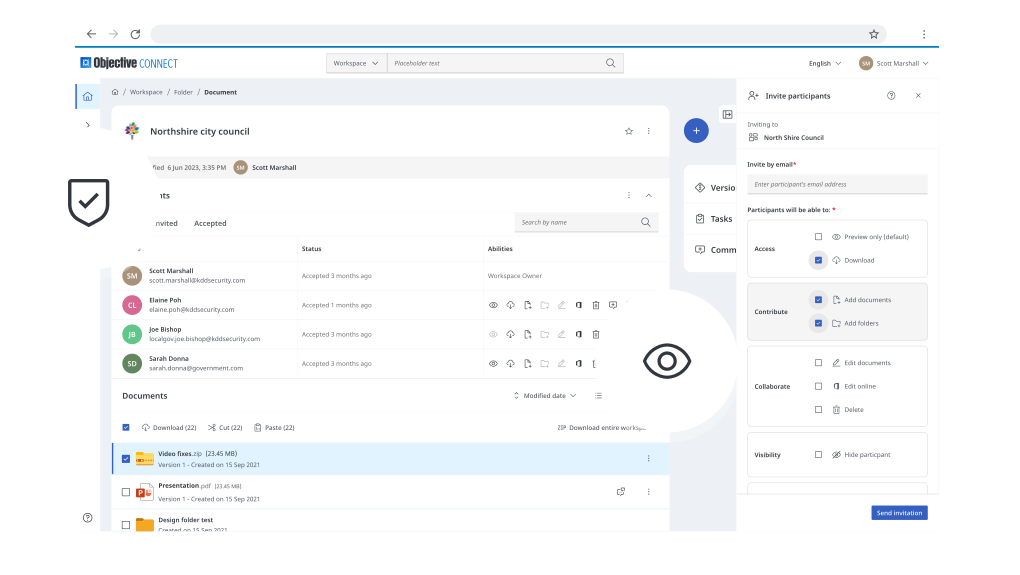
Use document tags and user privileges to control access to sensitive files. Bring multiple organisations into a shared workspace while restricting the information each participant can see.
Set permissions for viewing, editing and downloading. Use preview-only access and accountability watermarks when asset plans, tender documents or commercial proposals need tighter handling.
Update permissions, remove participants and transfer workspace ownership as contractors finish work, responsibilities change or projects move into operation.
Exchange engineering drawings, site images, reports, videos and other project files through a controlled workspace, giving authorised stakeholders a secure alternative to ad hoc transfer tools.
Co-author documents, annotate files and capture comments alongside the information being reviewed. Help engineers, consultants and delivery teams retain the context behind changes and decisions.
Integrate with Objective Nexus, Content Manager and Microsoft SharePoint to support external collaboration without giving stakeholders direct access to your internal records system.

Record document access, user activity and permission changes, helping teams establish how sensitive information was handled throughout an engagement.
Generate detailed activity reports and consolidated PDF reports to support project assurance, contractual discussions and internal investigations.
Review and digitally sign contracts, access agreements and other project documents within the same workspace, with controlled signing sequences and tamper-evident audit logs.

The system could not be easier to use and provides reassurance to our end users, ICT and Information Security alike.
Kevin Maxwell
ICT Service Support Manager, Cumbria County Council

















Secure collaboration across every financial services relationship

Exchange drawings and technical documents with authorised engineers, consultants and contractors in a controlled workspace.

Use Tag-Based Access Control to restrict asset plans and maintenance documentation to authorised service partners.

Capture comments and annotations alongside project documents to keep contractor feedback connected to the latest version.

Give suppliers a controlled space to contribute proposals and supporting files for review by authorised assessment teams.

Use preview-only permissions and accountability watermarks when sharing confidential designs, asset information or commercial proposals.

Bring operators and specialist responders together to share incident reports, site images and response documents with controlled access.

Review and digitally sign supplier contracts, access agreements and consultancy arrangements in one workspace.

Keep handover documents and stakeholder feedback together, with activity reports showing who accessed or contributed information.
Every interaction with operational documents is logged automatically in a tamper-proof audit trail, supporting your obligations under the SOCI Act, NIS2, and equivalent critical infrastructure frameworks. Compliance reports are generated on demand, ready for a regulator, auditor, or board review without reconstruction under pressure.
Administrators define exactly who can see what, based on organisation, role, and work package. Access is enforced automatically across every tier. When a contract ends, access is revoked instantly across every file and workspace.
Objective Connect is purpose-built for organisations managing sensitive operational information across complex project networks. Granular access control, tamper-proof audit trails, and sovereign infrastructure, within a platform your teams will actually use without routing around it.
Yes. Objective Connect integrates with Objective Nexus, Microsfot SharePoint and Content Manager, enabling documents to inherit your established access controls and compliance standards. External collaboration stays aligned with your internal governance framework without rebuilding policies from scratch.
Yes. Objective Connect is available on iOS and Android, allowing field teams and site crews to view, edit, and share files securely from any location.
Granular role-based permissions and secure online editing with no local file copies reduce the risk of accidental exposure and unauthorised downloads. Every access decision is enforced by the platform, not dependent on individual behaviour.
Yes. Contractors, consultants, and regulators are invited into a defined workspace without requiring access to your internal systems or lengthy IT provisioning. External users see only what they are authorised to see. When their engagement ends, access is removed immediately.
Blog
Decision advantage depends on information advantage—leaders must be able to trust, access and interpret information the moment it’s needed
Read MoreSolution Overview
An intuitive, modern and secure cloud file sharing and collaboration platform in use with many critical infrastructure organisations.
Read MoreSecurity Position
Discover how Objective Connect has systems and processes in place to continuously safeguard your sensitive information.
Read More


